SMS LaunchPro automates the preparation of data files for Launch Control campaigns. It eliminates manual processing, formats files according to 8020REI best practices, and produces ready-to-upload ZIP exports in minutes.
How to Access SMS LaunchPro
- Log in to your 8020REI account.
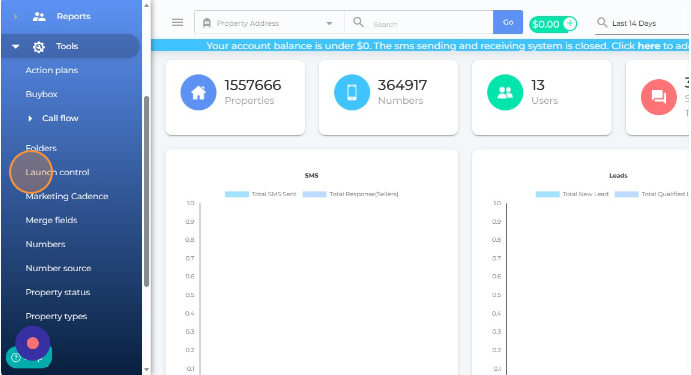
- Open the Tools menu — click the hamburger icon in the top-left corner, scroll down, and select Tools.
- Click Launch Control in the submenu to enter the SMS LaunchPro tool.
How to Export Files
- Click New Export in the Launch Control tool.
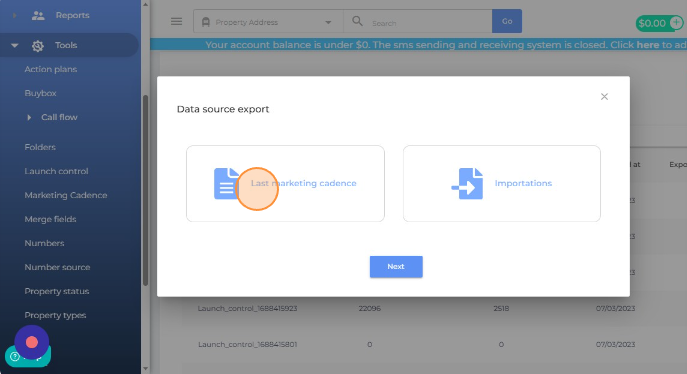
- Choose your export source:
- Export from Last Marketing Cadence — uses your most recent SMS cadence.
- Export from Recent Import — uses your latest data import.
- The system generates the files automatically.
- Scroll right and click Exported zip file to download your campaign-ready files.
Skip Trace Review File
Each export includes a second file containing properties that need new skip tracing, based on these criteria:
- Phone numbers added over 12 months ago
- Numbers marked as Do Not Contact (DNC)
- Numbers flagged as Wrong Number
Re-tracing these properties helps you focus on the most promising leads and improves contact quality and conversion potential.
Need Help?
Schedule a call with your Customer Success Manager or email support@8020rei.com.